 I tend to look for that good/best balance and most of software I use is quite good. Sometimes there is exception. App that is slow, with bunch of bugs and long abandoned by developers. App that does something so exceptionally good that flaws does not matter.
qliner hotkeys is a such app for hotkeys launchers, forgotten underdog that no competitor can match.
What it does
App allows to map common actions (launch something, open folder and so on) to Win+any key. That’s right – no obnoxious Ctrl+Shift+Alt+… combinations. Any and every hotkey here starts with Win and ends in another single key.
It has most fitting graphical interface (triggered with Win+Z or by holding Win for specified number of seconds) that displays all mapped hotkeys and allows to set new by simply dropping shortcuts on it.
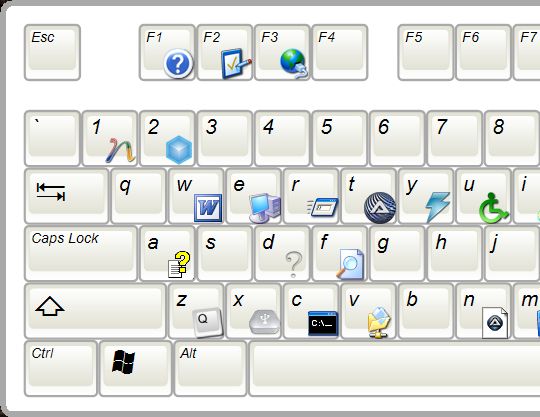
App logic easily obliterates most common issue - how to actually remember hotkey after you set it up. It makes combinations as short and possible and provides visual map on top.
Strong features
Superb logic and usability. What more is needed from hotkey app? The more it stays out of the way the better.
Downsides
I started this post with tale of apps used despite how they suck and there is plenty that sucks about this one:
- developers had long abandoned it, app is open source but last version hadn’t even made it to sourceforge project page;
- it runs on .NET Framework and even if I am not a fan of platform (I like software truly portable) this is objectively bad here – it lags, eats memory by tons and likes to hang system (especially when network shortcuts are involved).
Actually I only use it at work, because at home I have Logitech G15 keyboard, which offers enough of hardware hotkey bliss to not bother with software.
Overall
Seriously I am not even sure you should try this one now (I picked it up when it still had some hopes to be developed).
But I hope someone forks or completely re-writes this one. Or steals the idea at least, it is after all one of very few hotkey apps that actually make sense.
Home&download http://www.qliner.com/hotkeys/
alexsupra #
Rarst #
alexsupra #
Rarst #
Rick #
Rarst #
Rick #
Rarst #
Rick #
Rarst #