Codec - something you never knew you needed until your videos started to play upside down and with green stripes.
 Current situation with video codecs (mpeg4, DivX, XviD, h264, Theora) and containers (avi, mp4, mkv, ogm, wmv) is a mess. Solutions to this problem are abundant and stir holy wars second in fierceness only to “Vista sucks” issue. :)
As always I am sticking to tried and true solution. I am using K-Lite Codec Pack for a long time and I never had issues with it (some minor but those were solved by updating to newest version).
What a codec pack is?
Codec (coder-decoder) is something you need to play video. Some codecs come with Windows, some have to be downloaded and installed.
Codec pack is bundle of different codecs that aims to install everything needed for playing most common video formats.
It is supposed to be easy but I see whole bunch of these?
- K-Lite Codec Pack Standard - basic version for playing popular formats;
- K-Lite Codec Pack Full - advanced version that includes all bells and whistles;
- K-Lite Codec Pack Corporate - similar to Full but with components that are carefully chosen for corporate environment (not everything that is ok for home user goes well at work);
- K-Lite Codec Pack Mega - Full plus Real Alternative codec for RealMedia playback;
- K-Lite Codec Pack 64-bit - additional codecs for 64-bit players like Vista Media Center.
So what should I choose?
I advise to go for Full and choose “Playback only” profile while installing. This gets you what you need without what you don’t. This will also install Media Player Classic and set file associations to it. If you want to stick with your current video player you may go for “Playback only (without player)”.
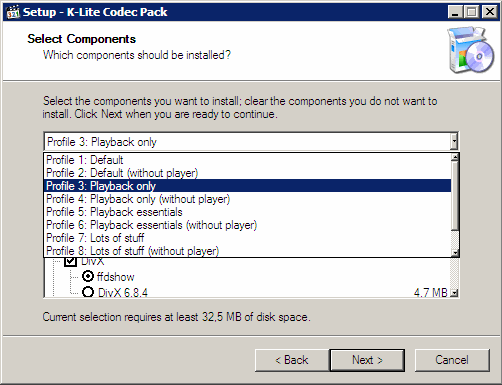
I was recommended to get all-in-one video player instead?
Video players that play everything are becoming popular lately. Basically such player contains bundle of codecs (often same as codec packs) but instead of installing them into system it keeps them close and personal.
Advantages of all-in-one player - they are often portable in design and don’t interact with system files at all.
Advantages of codec pack - works for any application or player of your choice.
Downsides?
K-Lite has quite a history of including proprietary and cracked versions of codecs into bundle. They seem to ended this practice long ago and all such components I am aware off are removed… Still video codecs may be very unstable legal zone. If that is issue for you choose Corporate pack and study all components before using it.
Links
Home page http://www.codecguide.com/
Talk Binary #
Rarst #
philblog #
Rarst #
Christoph Wagner #
Rarst #
Miro – exercise in media convergence | Rarst.net #
Transcontinental #
Rarst #
Troubleshoot media issues with Codec Tweak Tool | Rarst.net #
Install or update K-Lite media codecs in single click | Rarst.net #
venkata reddy #
Rarst #