 Ben of frogstr had recently posted on how gravatar can help your brand. It is indeed nice service (I am going to explain in details below) but taking in account people that simply hadn’t bothered to setup gravatar yet there is one awesome way to fix no-avatars problem on your blog.
That is pulling hash generated avatars from gravatar service.
Email hash
I had posted on some hash tricks in the past. Repeating basic idea - hashing is getting long weird looking string of characters from some input. In case of gravatar input for hash is email address you fill in when making comments on blogs. Hash allows to use your email for gravatar service without exposing it – it is not possible to calculate email from hash.
Gravatar service
Gravatar is online service owned by Automattic (developers of WordPress) that serves avatar images responding to specially formed URLs with MD5 hash in them.
Basically:
- Register on gravatar site with your email and upload image for avatar.
- Every gravatar-enabled blog will start showing that image near your comments.
Cool, isn’t it? Problem is for every person with gravatar there are hundreds without one. So comment discussions still look faceless with occasional gravatar splashes.
Inner workings
I said above that gravatar request is made with URL. So to see it I need hash email. I can either get it from gravatar image properties (right-clicking image in browser is usual way to get there) or go to online MD5 generator and calculate it.
Hash for my personal email is f2b6e0c8a09d8faadb50d56890e2528c. When I comment request is made to the following link: https://www.gravatar.com/avatar/f2b6e0c8a09d8faadb50d56890e2528c.jpg
And my gravatar is downloaded and pasted in page.

But what if I have no gravatar?
My contact email for this blog is contact@rarst.net. Its hash is ab89ce39f47b327f1c85e4019e865a71. And link: https://www.gravatar.com/avatar/ab89ce39f47b327f1c85e4019e865a71.jpg
gets ugly placeholder image:

Here come hash generated avatars!
Adding some parameters to URL makes gravatar send not an boring image but one generated from hash. So different hashes get different images, but as long as same email is used and same hash is calculated – same image is going to show for it.
Identicon https://www.gravatar.com/avatar/ab89ce39f47b327f1c85e4019e865a71.jpg?d=identicon
MonsterID https://www.gravatar.com/avatar/ab89ce39f47b327f1c85e4019e865a71.jpg?d=monsterid

Wavatar https://www.gravatar.com/avatar/ab89ce39f47b327f1c85e4019e865a71.jpg?d=wavatar

How to use them
Go to Settings > Discussion in WordPress admin area. It has setting that allows to choose what to show instead of placeholder image.
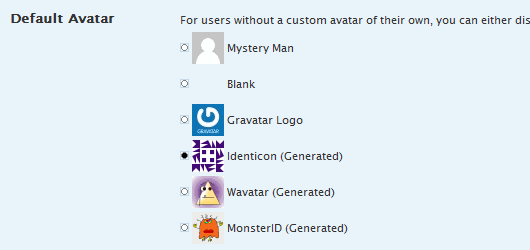
If it doesn’t work with your theme or you use different platform look for solutions in gravatar implementer’s guide and using gravatars WordPress Codex page.
Overall
Gravatars complemented by hash generated versions are very nice visual clue for comments in blog. It allows to easily spot active commentators or acquaintances even across different blogs.
MonsterID and Wavatar are bit too… Weird. :) I went with Identicon for this blog. So if you don’t have gravatar yet - comment below this post and check out cool geometrical pattern it assigns to you.
Link https://www.gravatar.com/
Ben from frogstr #
Rarst #
Lyndi #
Rarst #
gry planszowe #
Rarst #
Animoto.com – generate videos from photos and music | Rarst.net #
matt #
Rarst #