From time to time I’ve been getting slow responses and even occasional errors, when opening some new site for the first time. By these symptoms it is likely to be an issue with domain name resolution.
Today I looked up some tools in my bookmarks and decided to test provider’s DNS servers against third party ones.
What DNS does
Any computer (personal or server either) connected to modern network has an IP address. Set of numbers that identifies it. Humans on other hand prefer to operate with host and domain names.
DNS server is essential part of network that tells your software what IP address it should query for name you requested.
What are options
Traditionally DNS used is run by your Internet provider. After all without one it wouldn’t be much of internet connection to sell.
- pro it is likely to be nearby and fast;
- con not much… as long as it works properly.
There are also some major third party DNS servers from long-standing OpenDNS to released last year Google Public DNS. They try to provide better performance and additional features.
- pro might perform better, can offer protection from malware, filtering options and more;
- con in fact might be slower because it is farther.
So it is practical to test and see which variant fits your connection better.
Namebench
App is open source tool for testing DNS servers. It takes your current DNS server plus optionally popular third party servers and/or servers in close geographical proximity. Domains to test can be taken from browser history or from list of internet top domains.
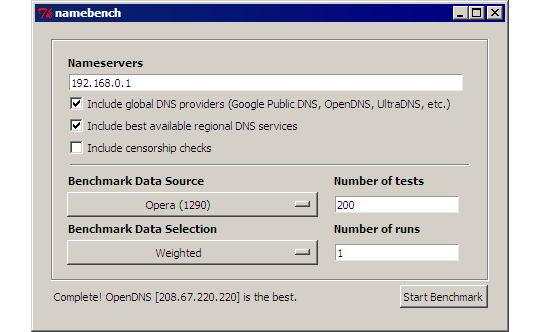
Namebench works without installation (self-unpacks to system temporary folder and runs from there). When done (took it ~15 minutes to finish) it generates combined report in HTML with conclusion on best-performing server, test data and two extensive plots with results distribution.
Home&download http://code.google.com/p/namebench/
DNS Benchmark
Another app for very same purpose. This one tests with less domain data (only 50 top domains) but tries more DNS servers.
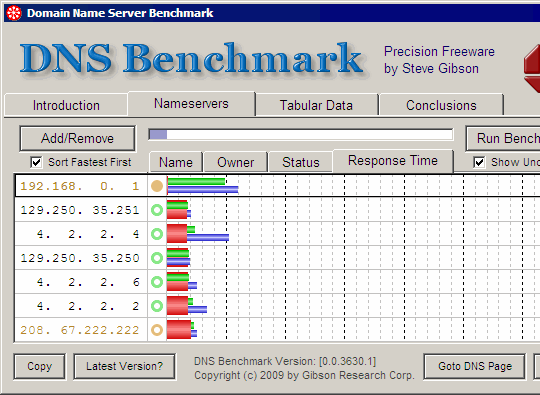
It includes plenty of explanations in interface and provides advice on DNS configuration on top of test results. App is single-file and natively portable.
Home&download https://www.grc.com/dns/benchmark.htm
Results
Namebench ranked my native DNS server low and came to conclusion that OpenDNS is 2.5 times faster, with much lower average response time. In its test Google DNS also outperformed provider’s.
DNS Benchmark came to quite different conclusions. In its test OpenDNS and provder’s DNS came first neck to neck with almost identical results and Google performed slightly worse than both.
I changed primary DNS to OpenDNS in my wireless router and left secondary DNS set to provider’s. Will see if I notice difference in experience over time.
Overall
Because of strong DNS caching mechanisms both on server and client sides its performance is tricky metric to test definitively.
It might not be a good idea to jump on whatever tests tell you, but it is definitely good idea to test at least once and ensure that provider’s DNS is fast enough and works properly.
kingpin #
Rarst #
Geek Squeaks’ of the Week (#47) « What's On My PC #
Saurabh #
Rarst #
Golden Code #
Rarst #
Vincent Chow #
Rarst #
Find The Fastest DNS Server & Change Easily #
Nime #
Rarst #
velociraptor #
Rarst #