November 7th, 2009 Software | comments_icon7 Comments

Xirrus Wi-Fi Inspector – radar for wireless access points

xirrus_wifi_inspector_icon I had power blackout for most of Friday evening so spent time hugging my notebook and went over some non-desktop software.

Xirrus Wi-Fi Inspector is app that simplifies locating wireless access points and helps troubleshoot connections issues.

What it does

App detects all access points in range and breaks info down into meaningful presentation.
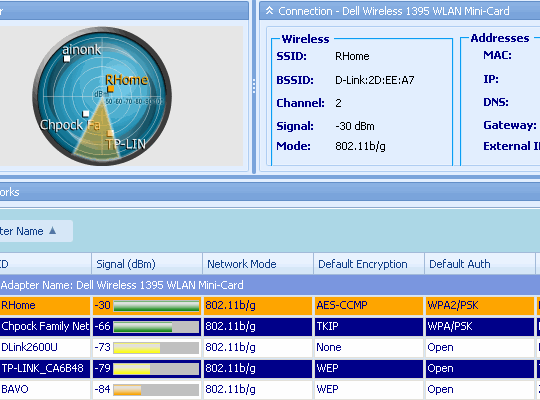
xirrus_wifi_inspector_interface

It uses ribbon interface so may seem somewhat bulky, but parts are easy to minimize or turn off.

Main zones are:

  • current connection info;
  • radar view of APs organized by signal strength;
  • table with breakdown of available details for each point;
  • graph of signal strength for current (and optionally more points) over time.

Strong features

What I liked most is locate feature, must be enabled for access point by right-clicking it in table section.

When it is on notebook starts to… click or something like that. More often when signal strength is strong and less often when it is weak. Very practical way to look for spot with best reception.

Overall

Simple to use with comprehensive information and nice extras. Too bulky for use like constant indicator, but there are slimmer gadget versions for that – see Xirrus Wi-Fi Monitor post at gHacks.

Home&download http://www.xirrus.com/library/wifitools.php (bit broken in Opera)

By the way their page also lists several excellent third party apps related to networking. Including iperf and TCPview I had covered and more I should definitely check out.

RSSGet updates via RSS

7 Responses to “Xirrus Wi-Fi Inspector – radar for wireless access points”

  1. The DataRat says:

    .

    Several months ago, I purchased a portable wireless modem
    for my laptops from my cell phone carrier. Works really great,
    and only cost $150 for the modem (connects to a USB port on
    my laptop) and $40/month for the Internet feed. Can use it
    on any of the notebook computers and netbooks our family owns.
    Even have used it a couple times at home when our Internet
    cable modem briefly went down !

    So, I’m freed from the tyranny of locating Wi-Fi hotspots when
    away from home. Nevertheless, I am a big proponent of back-up
    strategies. And this Wi-Fi locater you’ve been kind enough to
    share with us seems like a very useful tool.

    Thanx, Rarst !

    The DataRat

    .

  2. Rarst says:

    @DataRat

    Well, wifi coverage is very underdeveloped around here so for me it’s more of troubleshooting tool than looking for somewhere to connect.

    Wireless Internet is nice but pricey. I am eyeing newish 4G WiMax network which has unrivaled unlimited plans (~$10 for 512Kbit/s) but coverage is tiny so far.

    PS my backup strategy for when home optical line is down – sleep :)

  3. The DataRat says:

    .

    “Wireless Internet
    is nice but pricey”

    Paid my cell phone carrier $150 for the modem, and
    $40 every month for Internet connection. This compared
    to the $60/month I also pay for an Internet connection
    via cable TV.

    My broadband cable connection is fantastic. The cell
    carrier’s wireless, on the other hand, is about the
    same speed as the local phone company’s DSL Internet
    (here in Phoenix, Arizona, USA). But the cell modem
    wireless is GO ANYWHERE !

    There’s a lot of wireless hotspots in Phoenix (a city
    of 1-million in a metro area of another 1-million people).
    But it’s almost all encrypted ! Accessible, free wireless
    you just chance upon being rare here.

    My wireless modem attached to one of my laptops picks-up
    an Internet signal everywhere I’ve been …so far. This
    kind of freedom to have Internet everywhere I might be is
    worth the $40/month.

    Again, speed ISN’T equivalent to cable broadband. Yet it’s
    acceptable fast. Only really ever seems “slow” when doing
    big downloads. So, I simply avoid doing very large D/L’s
    with it. For casual Web browsing, and e-mail, it’s just
    fine.

    The DataRat

    .

  4. Chocobito says:

    Looks something big to me, I prefer InSSIDer, that do the same and its more light

  5. Rarst says:

    @DataRat

    Most mobile Internet around here charges for megabyte and a lots unless you go for large 5-10GB packages.

    This new 4G is first to offer unlimited for sane price.

    @Chocobito

    Thank you, will check it out. :)

  6. [...] time it was Xirrus Wi-Fi Inspector and Chocobito had recommended in comments another wireless scanner app – [...]

  7. I prefer InSSIDer to its more light indeed

Leave a Reply