I kinda resolved this summer to break away from cycle of disaster-driven upgrades. More or less done with Mini-ITX system and another component clearly in need of replacement was my old 19” Acer display.
I was eyeing several large monitors and one I was able to catch available and purchase was Asus 27T1E – 27” display and TV combo.
What was I looking for
I am not doing anything color-related so needed something consumer grade in that department. As for other wants:
- large physical size, but not necessarily high resolution (gets really expensive fast and with my poor eyesight I actually like lower DPI);
- internal speakers (in spirit of reducing clutter);
- HDMI for video and audio (in spirit of reducing clutter).
“TV monitor”?
Asus site lists this one both as part of regular widescreen displays and part of TV monitor series. Using LCD TVs as affordable large screen computer displays is hardly new idea, Asus just makes it kinda official offer here.
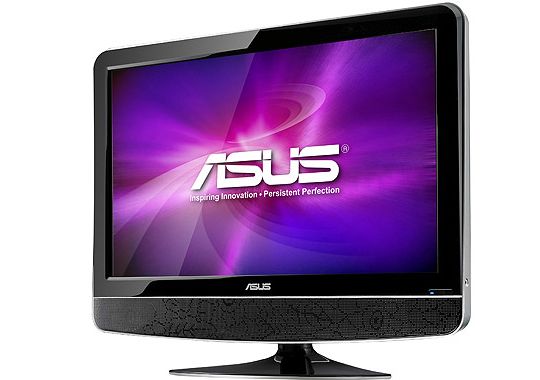
asus_27t1e
Essentially TV monitor series are TV units (with analog+digital tuner) that are marketed for use as computer displays. Result is somewhat tricky.
Model has extensive set of inputs, but strange one for a PC display:
- TV signal;
- VGA (D-Sub);
- 2x HDMI;
- 2x SCART;
- composite;
- S-Video.
Note that there is no DVI or DisplayPort.
Since I was going to use HDMI anyway I didn’t brood much over DVI.
HD, HDMI, EDID and overscan… equals WTF
Researching before purchase I came up on several mentions that there are issues with native resolution of 1920x1080 when using HDMI. I thought it’s probably nothing I can’t solve… And I stayed solving that till 3AM yesterday.
It turned out Asus was being lazy with their product, NVIDIA was being lazy with their drivers and then they met at my desk.
When connected through HDMI native resolution was horribly distorted and larger than screen. Turns out that stuff is called overscan.
- display identifies itself as TV-like (which it is);
- NVIDIA driver thinks that it is generic TV and formats signal for one;
- display doesn’t expect that;
- oops!
So to simply fix overscan you either need to:
- explain video card drivers that it is not a generic TV on other end and it needs to serve PC signal… which you can’t do with NVIDIA drivers;
- explain to display that it needs to treat input signal as one from dumb computer… which Asus didn’t bother to implement.
Screwed or what?
Many Internet pages and arcane tutorials later I had decent understanding of issue and possible fix. Display reports extended display identification data (EDID) with some extras that confuse video driver. So if we override extra part then driver stops over thinking situation and simply serves straight HD.
There are several methods, this thread on NVIDIA forums is most extensive I found on topic. For me following registry fix worked:
Windows Registry Editor Version 5.00

[HKEY_LOCAL_MACHINE\SYSTEM\CurrentControlSet\Control\Video\{21BC8C2D-6BFE-4DA3-8302-996777ECE4EC}\0000]
"OverrideEdidFlags0"=hex:04,69,f4,27,00,00,ff,ff,04,00,00,00,7e,01,00
Windows display id (after \Video\) is unique to OS installation and first four bytes of hex stuff (04,69,f4,27) are hardware id for specific display, unique to 27T1E model.
This fixed resolution for me… But display went mute.
- fix had disabled part of extended information about display;
- among other things that parts contains information that display is audio-capable;
- video card drivers see no point in transmitting sound to incapable device over HDMI;
- good that display has regular analog 3.5mm audio input;
- bad that display ignores that input when connected by HDMI and Asus didn’t bother to implement option to control this behavior.
So video card driver refuses to send digital audio and display refuses to listen to analog audio.
Screwed twice.
I went through manual and according to it for HDMI transmitted without audio you are supposed to use separate RCA audio input instead of 3.5mm one. Luckily my (now deprecated) speakers had such cable, which I promptly looted and got both video and sound working properly at the same time.
First impressions
Aside from some hours of dealing with crazy overscan issues display is actually very nice.
27” screen size is very spacious. Excellent for browsing and coding, gorgeous for video.
2x 7W speakers are decent (not worse than generic speakers I had for like ten years) and deliver more volume than usual for integrated in display. Volume controls are conveniently on top of display and there is headphones output on the right side (sadly no microphone one).
For calibration I tweaked colors in NVIDIA control panel wizard. Was also going to adjust contrast and brightness but came upon ASUS Smart Contrast Ratio (ASCR) in display menu that controls those automagically by analyzing current input in real time. Trialing it on, so far so good.
Don’t really need TV part, I’d actually prefer TV-less MT276H model, but it doesn’t seem to be sold around here.
Overall
Asus did absolutely horrible job of adapting LCD TV to the role of PC display. Many generic LCD TVs are actually better adapted to be used in that way, even without being marketed for it.
Aside from that what you get is large full HD display (with TV tuner on top) with good image quality for moderate price.
Link http://www.asus.com/product.aspx?P_ID=3PJNaUQVQHWCPPAt
Rush #
Rarst #
Rush #
Rarst #
udemi #
Rarst #
Gerard #
Rarst #
p1ague #
Rarst #
p1ague #
Rarst #
dk2000 #
Rarst #
Kathilein #
Rarst #
Kathilein #
Rarst #
Marco #
Rarst #
Marco #
Rarst #
Rich #
Rich #
Rarst #
Rich #
Rarst #
Rich #
Rarst #
Rich #
Rarst #
Rich #
Rarst #
Rich #
Ruben #
Rich #