 After my host’s adventures in having their customers badly hacked in spirit of upping security they enabled secure SFTP access to files. I looked up plugin for my file manager and decided it was all better. Except that plugin performance was far from perfect – slow connections, CPU load spikes, mediocre transfer speeds.
So I gave up on it and decided to try WinSCP – open source file manager for transfers over secure protocols.
What it does
WinSCP connects to remote computers via one of supported protocols (SFTP, SCP, FTP) and allows to manipulate and transfer files in file manager fashion.
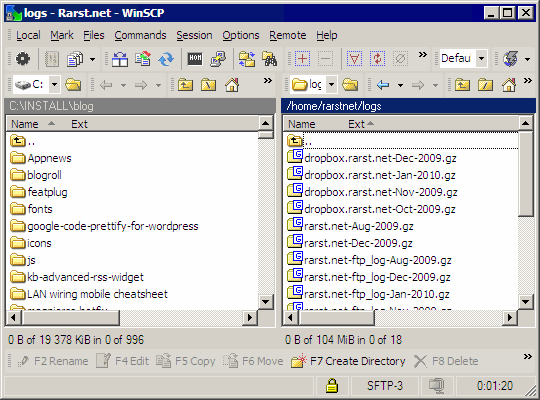
Curiously app offers two different interface styles:
- classic dual-pane file manager with one pane dedicated to remote PC and one to local PC:
- Explorer-like interface with single window for remote PC.
Strong features
App goes beyond file managing and packs a lot of related and simply convenient features:
- synchronization features, including automatic sync of local folder to remote machine;
- extensive command line options, I liked that I can instantly connect with specific saved profile, using its name as parameter;
- external editor support with automatic file download an re-upload, see excellent tutorial on integrating Notepad++ with WinSCP; I think this supersedes my usual way of Notepad++ FTP plugin;
- scripting support, my FTP backups with Cobian Backup had been slow because of large file quantity and this just might replace it after some tinkering;
- execution of remote commands (with sufficient rights and configuration), predefined command examples include packing and unpacking files server-side;
- multiply portable options – native, U3, PortableApps; manual lists some additional tweaks if you want to keep temporary files contained in app folder.
Downsides
I have no real gripes so far.
If I had to choose something it would be messy configuration process with settings split between menus in initial screen and in core interface. It took me some time to look through everything and set it up the way I wanted.
Overall
Smooth experience and set of sophisticated functions. App is pleasure to use and works without resources and transfer hiccups.
Home http://winscp.net/
Download http://winscp.net/eng/download.php
PortableApps http://portableapps.com/apps/internet/winscp_portable
Angelo R. #
JeeMan #
Rush #
Rarst #
Francis #
Rarst #
Nathan Abraham #
Rarst #
Nathan Abraham #
Rarst #
Nathan Abraham #
Rarst #