 Installing software in Windows is mixed blessing. It allows some good tricks like separate user profiles for same programs and nice team play between apps with centralized settings storage (registry)… But sooner or later day comes when you must part ways with app. Or at least upgrade it.
Process of uninstalling software in Windows… Well far from good. You get long messy list of stuff and that’s all.
Revo Uninstaller is one of utilities that act like steroids for uninstall process.
What it does
While it’s better to leave actual uninstalling to app itself Revo enhances it in two ways:
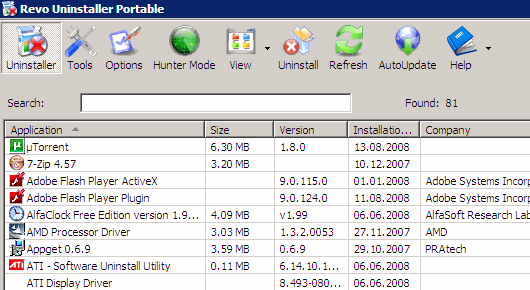
Before the uninstalling. Between customizable and sortable icon/list view, type-to-find search and manly “hunter mode”… Finding app you want to uninstall or even finding out what app you want to uninstall is extremely fast. :)
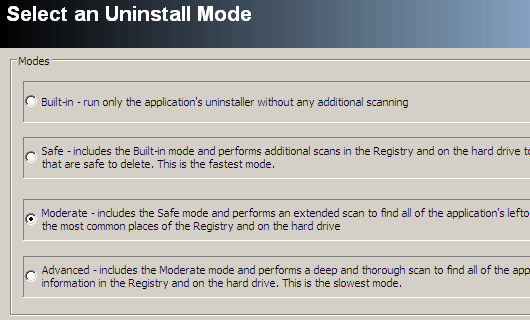
After the uninstalling there is optional cleanup that looks for all leftovers. Files, folders, registry settings. Nice both for cleaning junk and reminding to archive data you want to keep (like saved preferences or game saves).
Additional functions
There is bunch of secondary tools included for cleaning up, privacy, managing autorun , etc. Still Revo feels mostly like solid uninstaller, rest is because-developers-could stuff.
I only have one but major complaint about app - it could really use queuing to uninstall several apps in single sweep.
Overall
Revo Uninstaller is freeware with portable version available.
Home page http://www.revouninstaller.com/
Download page http://www.revouninstaller.com/revo_uninstaller_free_download.html
WebTrafficROI #
Rarst #
Talk Binary #
Rarst #
Ky #
Rarst #
Ky #
Rarst #
Ky #
Rarst #
Josh #
Rarst #
Josh #
Rarst #
Josh #
Ky #
Rarst #
Ky #
Rarst #
tim #
Rarst #
How to organize setup packages | Rarst.net #
Best and worse computing advice – readers’ choice | Rarst.net #