August 20th, 2008 Software | comments_icon8 Comments

Mouse hotkeys in Opera

opera_icon Yes, title is right. :) Obviously not lots of hotkeys since mouse only has two proper buttons… Ok, mine has seven but we are talking about mice in general.

  1. Hold left mouse button and click right mouse button to go forward.
  2. Hold right mouse button and click left mouse button to go back.

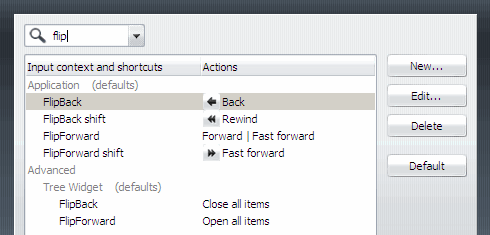
Opera calls such movement flip.

Try these and soon dragging your cursor to back button or repeatedly waving a mouse gesture (hold right mouse button and drag left/right) are going to be forgotten bad dream.

That’s pretty much core of today’s post. Read on for some extra stuff with flips, way to customize them and links for today’s Opera update.

If you hold shift while you do these it is going to take you really back (to where you started) and really forward moves.

In sidebars with folder trees (like in bookmarks) these are opening or closing all folders at once.

As with all hotkeys in Opera you can easily remap them to anything.

Tools > Preferences (Alt+P) > Advanced > Shortcuts
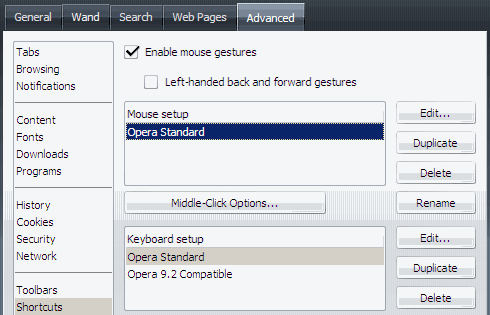
opera_advanced_shortcuts

Select mouse setup and press Edit. Type "flip" in the search.

opera_flip

By the way Opera just got minor update to 9.52.

Download page http://www.opera.com/download/

Changelog http://www.opera.com/docs/changelogs/windows/952/

Opera@USB is not out yet, if you prefer portable look for update on my sidebar or follow my software updates RSS feed. :)

RSSGet updates via RSS

8 Responses to “Mouse hotkeys in Opera”

  1. Wow! I was playing with the Left then Right with the mouse…

    Really worked! Thanks for this neat tip. I love shortcuts…

    I’ve been using Opera since Firefox has been giving me some errors recently and Opera hasn’t ever.

  2. Rarst says:

    Yep, I like flips. It’s easy, useful, obvious and somehow only Opera got it implemented (as far as I know). Common story with Opera features actually. :)

    Smart usability ftw.

  3. I agree. Plus I like Opera’s nice clean layout. It doesn’t feel cluttered as Firefox and IE.

  4. Mouse gestures are really nice and Opera is a fabulous browser. In fact I much prefer Opera to Firefox but the only reason why I continue using Firefox is because of all the toolbars and extensions I use!

  5. Rarst says:

    Yeah, it’s a pity that Opera is mostly ignored by sites that provide toolbars and such. They just give you “upgrade your browser crap”.

    It’s just their laziness – why develop for everyone when you can target IE and Firefox and discard rest.

  6. The DataRat says:

    .

    Another great Opera tip from Rarst !

    .

    Today was perusing File Forum, and a reader’s comments
    in one of the articles there made the statement that
    all Opera is, is a copy of Firefox !

    http://fileforum.betanews.com/

    Wow. They got it exactly BACKWARDS.

    Fascinating how popular perception often gets things
    diametrically ~reversed~ !

    The DataRat

    .

  7. Rarst says:

    @DataRat

    More than common situation. :( A lot of users that bash Opera are completely ignorant about features and had barely looked at browser.

  8. [...] worked perfectly but some specific part of text was completely ignored. This might be issue with Opera hotkeys interfering, but I am not [...]

Leave a Reply