 There are plenty of interesting services that take links as input and do useful things with them. Good example are services for improving readability of pages.
Piping page through such service is rarely streamlined and requires copy/pasting link or using bookmarklet. Clunky. So here is how to modify Opera to open links in services from context menu.
Opera menu system
Menus in Opera may seem rigid but they actually are (like rest of interface) very flexible and relatively easy to modify.
Opera stores default menu settings in defaults\standard_menu.ini. To start modifying that one must be overridden with menu file in profile folder.
Tools > Preferences (Alt+p) > Advanced > Toolbars > Menu setup > Duplicate
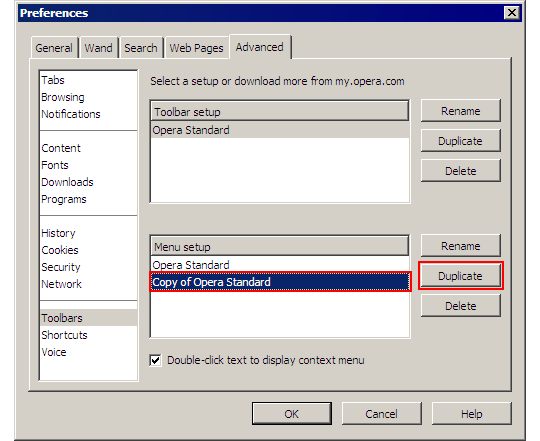
opera_menu_duplicate
Adding custom command
As example I will use command that opens link in new tab with Finch (should be in single line):
Item, "Open link with Finch" = "Go to Page, "javascript:
window.open('http://finch.ploogy.net/finch/'+'%l'.substring(7))""
JavaScript is used to:
- cut http:// part from link (Finch doesn’t like it);
- prefix it with Finch address;
- instruct browser to open resulting link.
Add this line into context menu:
- close Opera;
- open menu config file created earlier (likely \profile\menu\standard_menu(1).ini ) in text editor of your choice (as always I suggest Notepad++ )
- profile folder may be in different places, see opera:about for exact location;
- add command line in sections [Link Popup Menu] and [Image Link Popup Menu]
- restart Opera.
New command should appear in context menu when you right-click links:
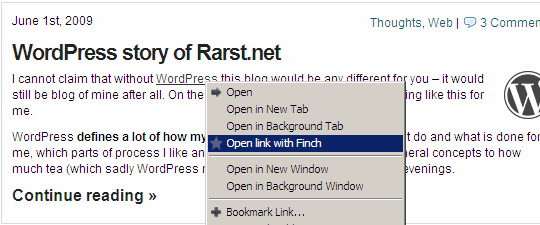
opera_context_menu
Overall
Context menu is one of the most basic and convenient ways to perform actions related to element. Editing context menus may not be most user friendly but it is powerful feature that can save a lot of time and clicks.
By the way if you want to provide custom menus for all users in centralized way check post about Opera super setup.
Chukx #
Rarst #
opera fan #
Rarst #
opera fan #
T.Terlemez #
Steve #
Rarst #