 Opera has one of the most flexible interfaces I had ever seen. It’s not really obvious but it’s there. Buttons are important part because clicking them is as fast as mouse-driven interfaces can get.
Default buttons
You can see default buttons all over interface. Trick is you can easily move them around or add more of them for quick access to stuff you use most.
To enter interface customization mode right-click any toolbar > Customize…
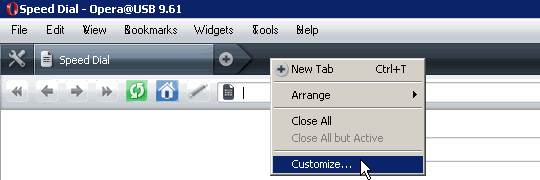
opera_customize
Then go to Buttons tab and there you have all default buttons to play with. You can drag and drop any button to almost any place in interface. To remove button from interface right-click button > Remove from toolbar .
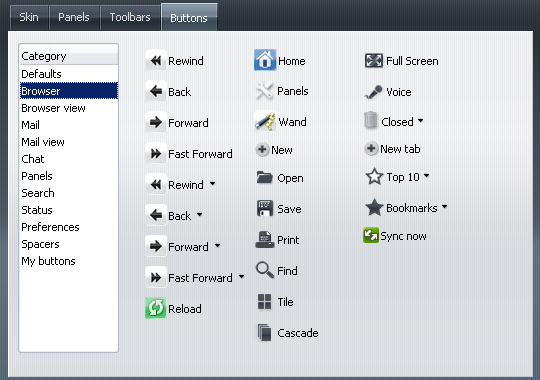
opera_buttons
Actions
Default buttons seem solid but as rest of Opera interface they are only shortcuts to internal Opera actions .
Opera actions are designed to be human-readable. AllActionsListPlus page at OperaWiki is good reference on them.
Custom buttons
Custom button is combination of specific action(s) and text/image for button appearance . Images used are usually taken from current Opera theme. Custom buttons are added by clicking special Opera-specific URLs and saved in ini file in toolbar sub-folder of Opera profile folder.
Button URLs
Code for button URL looks like this
opera:/button/Go%20to%20page,%22www.rarst.net%22,,
%22Go%20to%20www.Rarst.net%22,Go%20to%20homepage
And this is result go to www.rarst.net button .
It’s rather troublesome to create such link manually. It can’t be launched from address bar either – it must be in page. Luckily there are some sites online with plenty of useful premade buttons . Same page lists few web-based button generators that allow fast and easy button creation.
Tweak Opera for large amount of tabs | Rarst.net #
The DataRat #
Rarst #