
[update] Nowadays I highly recommend to use WinSCP instead, it supports more secure connections and integrates with Notepad++ well.
My main issue with WordPress engine this blog is running on – editing files online sucks. Despite all that online applications hype web browsers never meant to be text editors and totally fail as such.
There is tried and true option of downloading file from FTP, editing it and uploading back. I am so not patient enough for that. Luckily Notepad++ came to rescue with its FTP plugin.
What it does
Notepad++ by itself is great text editor and I had previously covered that. FTP plugin effectively makes it capable of editing file on FTP server. It’s not actually editing remote files, more like editing copy of file which is automatically synchronized to server.
Setup
[update 2009-12-29] In recent versions of Notepad++ plugin is no longer included by default, thanks to Kadimi for heads up in comments.
- download it from http://sourceforge.net/projects/npp-plugins/files/FTP_synchronize/
- unpack into \Notepad++\plugins\
Plugins > FTP_synchronize > Show FTP Folders will display plugin interface in sidebar-like fashion. You can make it float by double-clicking title.
Settings button shows dialog where you have to input your login details. Don’t forget to press New button first. You can also specify starting directory – useful if you work in specific subfolder (like WordPress theme one).
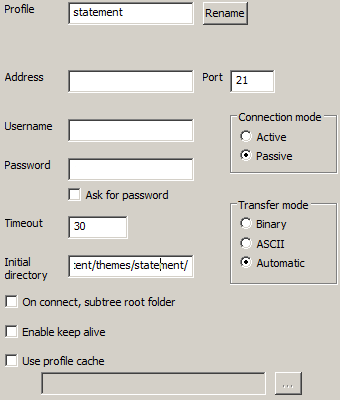
notepadpp_ftpsetup
After that pressing connect button and selecting profile loads folder tree in plugin window. More buttons to play with but in general double-clicking file will open it for editing and saving file (in usual way) will update it on server .
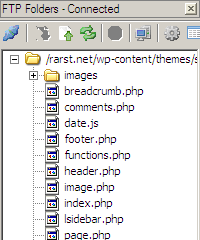
Just don’t forget to make backup of everything first, it’s easy to get carried away and break something on your site.
Notepad++ update
Version 5.1 was released recently. Program got separated into Unicode (main fork) and ANSI (for Win98 and earlier) versions.
I got some problems with copying it over my old version so had to do clean install. Not all plugins are Unicode compatible at moment either.
Download page http://sourceforge.net/project/showfiles.php?group_id=95717&package_id=102072
Lyndi #
Ben Tremblay #
Rarst #
Ky #
Rarst #
Nihar #
Rarst #
Pallab #
Rarst #
Navjot Singh #
Rarst #
Nick Staroba #
Rarst #
Twelve months blogging milestone | Rarst.net #
Kadimi #
Rarst #
Kadimi #
Rarst #
Kadimi #
Notepad++ – multipurpose text editor | Rarst.net #
WinSCP – file manager for secure transfers | Rarst.net #
FK #
Rarst #
Scott Maggelet #
Rarst #
Computer Cleanup and Spyware Removal, Lake Geneva, WI #
Rarst #
File Manager #
Jacob #
Rarst #
Jose Gustavo #
Jason #
Rarst #
Francis #
Rarst #
domagoj #
Rarst #
domagoj #
. #
. #
Rarst #
. #
Pieter #
Thiago Santos #
Tyler #
Andrew #
Rarst #
kuyilsamy #
Paul #
Rarst #
id meneo #
Rarst #
Mathias #
Michael #
Rarst #
Paul #
Daniel C. #
Linus Ikechukwu #
aka #