How to cleanup viruses hijacking executables
Windows has interesting registry key called Image File Execution Options. It is rarely useful to users but is total bliss for viruses. Worst part – modifications viruses make there often cripple system for good even after virus itself is removed.
So if system behaves strangely after virus attack was cleaned then remaining harmful registry entries must be destroyed.
What it does
Registry key provides perfectly legitimate function – attaching debuggers to executable files. In human language – it allows to create entries that say if application A is launched then start application B instead.
How viruses use it
- Attach to common system executables (like explorer.exe) to secure running virus always and in a manner harder to detect than common autorun entries. When virus is removed this may prevent system files from running at all.
- Prevent antivirus software from running by attaching executables that may not even exist. If antivirus utility can’t start it is worth to try renaming its executable file.
Cleanup
Manual registry editing is always an option but far from comfortable. Much easier is using Autoruns which has Image Hijacks tab.
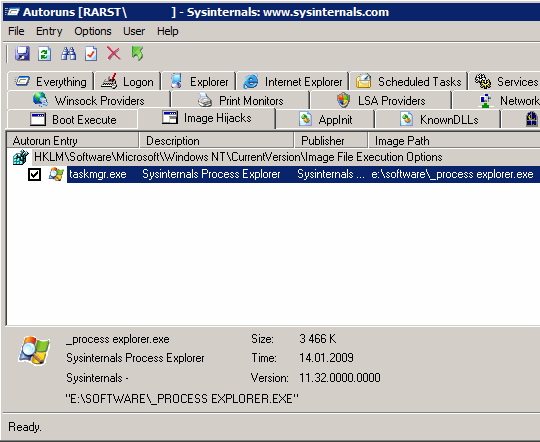
On screenshot there is example how Process Explorer replaces Windows task manager. If there are entries here – it is often sign of virus infection. Right-click > Delete (or Ctrl+D or Del) to remove entries, right-click > Jump to… to open entry in registry editor..


This is scary stuff. If I am understanding correctly it means that anti-virus software is not sufficient. We also need something like this to to keep tabs on the registry.
The Net is not fair. The ‘good’ guys have to spend hours keeping their equipment as safe as they can while the ‘bad’ guys just do as they please.
@Lyndi
If specific virus is known by antivirus software used – it will be killed without chance to do harm (which is the point).
However if virus is fresh and not detectable yet – sadly antivirus doesn’t stand a chance.
Some security software offers registry protection functions, I think Comodo firewall (I posted about) has such.
Rarst i have got new problem with my system dude..Virus hijacked my exe files.After having the new Operating system on my machine,am scanning the system and its not finding anything.
But when i try to double click on any exe file the virus firing up and causing the same problems.
I suspect virus hacked my exe files and firing when i click on any exe.
Any suggestions for Rarst or guys here :(
@Lax
What antivirus are you using?
Try portable CureIt, it’s good. My post:
http://www.rarst.net/software/choosing-portable-antivirus-clamwin-vs-cureit/
Direct download:
ftp://ftp.drweb.com/pub/drweb/cureit/cureit.exe
Either your antivirus is missing actual virus and you need clean with another one or system is damaged by past infection.
Autoruns is great for removing startup entries left by virii. It just take some time to tell my friends which one is good, and which one is bad. svchost is not the same as svch0st. Sigh~
@MK
Yeah, exactly. :) That’s why I run everything remotely suspicious through VirusTotal
http://www.rarst.net/web/virustotalcom-thorough-online-antivirus-scanner/
However viruses are not likeliy to mask names lately. If it’s in and active – antivirus is most probably dead by then. If antivirus is faster – blending name won’t help much.
I’m using McAfee latest version which they gave free one year subscription for the new year.
I will try curelt which you said..Thanks Rarst.
Security is very important and most people aren’t prepared for it at all. Even with antivirus, spyware, software and hardware firewalls you still can have issues.
I thought That I was on top of this, but even running Avast Pro, Webroot Spy Sweeper, Out Post Firewall Pro and a hardware firewall. Updating my definitions as often as the software would left me, I still got hit somehow.
After seeing that someone was charging up a storm on one of my credit cards and it was all porn related. dealing with the credit card company was very easy and everything is fixed and charges reversed now.
However, this made me think it is time to go back to a Linux based system using Ubuntu for surfing the web, emails and my electronic banking.
I believe that a Windows based system just won’t cut the cake for security.
@Madmouse
Well my best security app is Process Explorer constantly running on second monitor so I can simply see if something acts weird. :)
That’s quiate a setup btw, you sure it was computer related? Could leak from 3rd party or offline altogether.
And I agree that most people aren’t prepared. Not much can be done about that.
@Rarst
It is very confusing because I also run Mailwasher Pro which gets rid of almost 99% of the trash before it hits Thunderbird. I am the only one who uses my system, so it kinda points it back to something I did. I wonder sometimes about Firefox plugins if they could cause an issue like this.
@Madmouse
Yeah, strange indeed. :(
Never heard of this. Anyways thanks for the post. Now i know how to clean it up.
Like most, I have my favorite anti-virus product (Avira AntiVir Personal – freeware version), firewall (ZoneAlarm Free) and on-demand spyware tools (Malwarebytes and SuperAntiSpyware). I use these products on all of my home’s ‘Net-facing PCs.
But the best tool I use: default LUAs (Limited User Accounts).
No Power-User accounts and the single Administrator account has a strong password. The Admin account is strictly used for system maintenance, patching and software installations, only. No casual surfing permitted with this account.
I can’t believe the number of folks who still surf and play on the ‘Net with full Administrator rights. Most folks seem to believe it’s too much trouble to lock it down and stick to it.
@Altiris_Grunt
Heh, guilty of running under admin. :) At work I kinda have no say about that. At home running under user would makes me miserable in about three hours (yes, I tried).
On security online I stick to opinion that most threats either need you to do something stupid or use holes and don’t care about what you do at all.
Brain handles former, decent browser (I use Opera) and security software/patches latter.
Here’s a related article regarding LUAs and Windows 7:
http://blogs.zdnet.com/hardware/?p=4627
[...] Only thing that could be better if app offered at least basic editing capabilities on top of pure search. Relying on native editor can bite in some situations, like when malware blocks it with executable hijack. [...]