 Several Windows versions ago cleanup of DLL files was just as popular as registry cleanup. Modern storage doesn’t mind extra file (or hundred), but technically issue of orphaned libraries never went away.
DLL Archive is an utility that scans computer for unused library files.
What it does
App works in two stages:
- scan of computer for all libraries;
- checking Windows for library references and cross-checking with found.
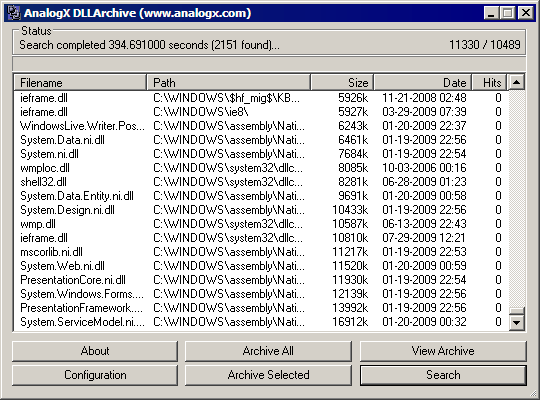
Results are presented in classic multi-column interface and are sortable. All or selected files can be moved to archive folder.
Strong features
There are some configuration options about what files and where should be searched (like excluding external drives and limiting search to system folders).
App doesn’t go deleting stuff, but only copies files to archive folder, from which they can be restored.
Needs and wants
- don’t see why there is no option to search specific path;
- information could use file version, when available.
Downsides
Really I wouldn’t recommend just using this app. Process is safe in theory, but with usual software zoo you never know and missing library can break more things than missing registry key.
Overall
Not recommended for straightforward usage, but solid and interesting as research tool for libraries. I found some files dated 2001. :)
Home&download http://www.analogx.com/contents/download/System/dllarch/Freeware.htm
The DataRat #
Rarst #
OAlexander #