I was uninstalling Microsoft Visual Studio yesterday and all those extra components it pollutes computer with. And this morning I was greeted with completely blank desktop and error message. Microsoft…
Blank desktop (actually with wallpaper and mouse cursor) is a sign that Windows shell, namely explorer.exe, did not start properly. Good news is that it’s often easy to fix without Windows reinstall or recovery.
What is explorer.exe
Windows is not really monolith. Shell runs as explorer.exe process and is part that manages important, but standalone chunk of interface that includes:
- desktop;
- start menu;
- task bar;
- native file manager;
- most of end-user autorun entries.
So when shell fails you lose all of these, but OS itself just goes on. Not that you can do much with it in such state.
Common issues
There are three most common reasons for:
- explorer.exe file was destroyed or corrupted;
- shell settings were hijacked or erased by malware;
- faulty DLL crashes explorer.exe on launch.
How to start software without shell
- Ctrl+Shift+Esc hotkey opens Task Manager.
- File > New Task (Run…) there allows to type in or browse for executable and launch it.
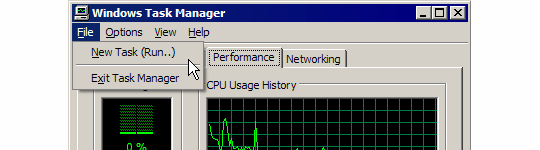
windows_task_manager
This is your lifeline. As long as you can launch something you can attempt to fix situation without drastic measures.
Things that will be of use
It is best to come prepared, but if you can get to browser and Internet you can prepare in the process as well. You will need at least some of these (preferably portable and ready to use):
- file manager (Q-Dir will do if you need something that looks common, otherwise choose your own poison);
- search tool (inside file manager or good one like Everything);
- anti-malware scanner (I’d start with CureIt);
- autorun manager (Autoruns);
- registry editor (native regedit.exe will do, but things like RegScanner help);
- event log viewer (native eventvwr.msc or MyEventViewer);
- Process Explorer is much better than native Task Manager for troubleshooting.
Things to check
- Run scan for malware, it is probably most common issue. Even if it cleans up malware it might leave explorer.exe broken (which is why it often breaks after malware is killed).
- Run chkdsk.exe to check hard drive for errors.
- Verify that explorer.exe is present in Windows directory.
- Verify (and correct if needed) that shell is pointing at explorer.exe and it alone, without additional parameters or anything, easy to see in Autoruns or in registry
HKLM\SOFTWARE\Microsoft\Windows NT\CurrentVersion\Winlogon\Shell - Verify that explorer.exe isn’t being hijacked.
- If there are DLL errors try to find missing files (or copy them from another PC with same Windows version, can also download from Internet but careful with that) and place them in Windows\system32 (called something else in 64bit versions) folder.
If none of this helped it is time to hit the logs and situation is an uncommon one.
Overall
Blank desktop is usually much less of a problem than it seems. You can easily run most of software and even get online. As long as you know how to check and fix common issues it is easy situation to get out of.
Saurabh #
mypsick.com - שולחן עבודה ריק #
Rarst #
Seelenwahnsinn #
Rarst #
Seelenwahnsinn #
Rarst #
nathan #
Rarst #
nathan #
Rarst #
Yendo Braz #
Rajesh kumar #
NosaAlonso #