 I came home today and there was incoming message waiting with request for software advice. Friend wanted something easy and efficient to convert YouTube video into avi . I knew that Google or Softpedia either would probably give few millions of fitting software so I started with my Opera bookmarks .
And there is it was (in the folder of much buzzed applications) – Any Video Converter (AVC).
What it does
All video converting applications are same. They take video as input and video as output. The more types of video are available (and the less money app costs) – the better it is.
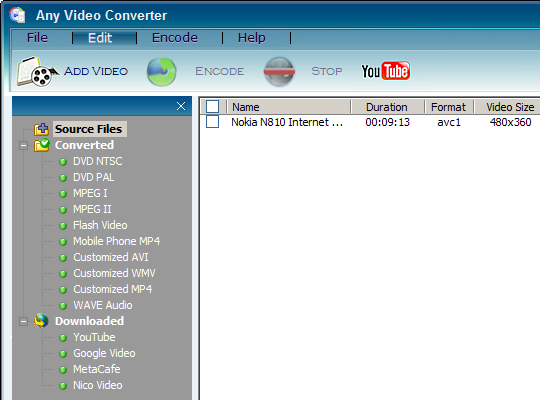
AVC takes in most of common computer video formats including flash videos. No support for ripping DVD but it does support it as output.
On top of converting functions AVC has internal downloader that supports few video sites – starting with YouTube of course.
Internal workings
As most of its kind AVC is based on FFMPEG . It means that quality for whatever will be exactly same as with most other converters. Such software is mostly only an interface meaning that usability and stability are more important than standard core.
Downsides
My personal opinion but app looks… bad. “Want to be Vista-like but fail” type of looks. I had also experienced some parts of interface getting stuck when toggling sidebar. I’d prefer standard (and productive) window instead of trying to be fancy.
It also shows nagging prompt to go look at paid professional version. Shows it a lot. Very annoying. I checked that compare versions page in the end and in my opinion extra profiles for mobile devices is so not something interesting to pay for.
Overall
Aside from interface and being nagware app gave impression of fast and solid solution. Encoding from YouTube was especially efficient – I only had to paste link, choose profile and click Encode . Easy.
Users of expensive converters won’t be impressed but for a freebie this one works excellent.
Home&download page http://www.any-video-converter.com/products/for_video_free/
Video tutorials http://www.any-video-converter.com/avc-youtube-videos-01.php
Ben Tremblay #
Rarst #
Ky #
Rarst #
Toni #
Rarst #
Peter #
Rarst #